How to Sell Digital Products on Shopify: A Beginner's Guide for 2026
A walkthrough for new merchants starting to sell digital products on Shopify: product setup, taxes, file hosting, delivery, and protecting against piracy.
By Vellir Technologies · Published 18 March 2026
Bottom line
Set up your product with shipping disabled, configure digital tax rules for your region, and pick a delivery method based on volume. Manual email and Shopify's free Digital Downloads app work for low volume; a dedicated delivery app like FileFlow is worth it once orders pick up.
What Counts as a Digital Product
A digital product is anything a customer downloads instead of receiving in the post. Common categories:
- Ebooks, guides, and PDFs
- Music tracks, sample packs, and audio
- Software, plugins, fonts, design templates
- Photo and video assets, including Lightroom presets
- Course materials, worksheets, and printables
The technical setup is broadly the same across all of these. The differences show up in file size, how often you update the file, and how much you care about the file being shared after purchase.
Setting Up the Product in Shopify
A digital product is a regular Shopify product with shipping turned off. The steps:
- In Admin, go to Products and click Add product.
- Add the title, description, and images as you would for any product.
- Under Shipping, uncheck “This is a physical product”.
- Set inventory tracking off, unless you genuinely have a limited number of licences.
- Set any tax codes that apply to digital goods in your region (more on this below).
- Save.
That gives you a sellable product. What it does not give you is a way to deliver the file. That is a separate decision, discussed later in this guide.

Tax on Digital Products
Tax rules for digital goods are stricter than for physical goods, and they vary by region.
- EU customers. VAT on digital goods is charged at the customer's rate, regardless of where you are based. If you sell to EU customers, you need a VAT MOSS arrangement or an equivalent.
- UK customers. VAT applies, with similar logic to the EU. The threshold for registration depends on whether you are based in the UK or not.
- Australian customers. GST applies if your annual turnover exceeds AUD 75,000.
- United States. Varies by state. Several states tax digital goods; others do not. Some states tax software differently from ebooks.
If you have any doubt, consult an accountant in your region. The tax conversation is one of the few places where a small upfront cost pays for itself many times over.
The File Hosting Question
Shopify itself is not built for hosting downloadable files. There is no native file storage you can attach to a product, no automatic delivery on purchase, and no download tracking. For anything beyond a single static link in a confirmation email, you need either an app or an external arrangement.
Three patterns play out at this stage:
- Email the file by hand. Watch the orders inbox, attach the file, hit send. Fine at very low volume, breaks at 3am.
- Public cloud link. Drop a shared Google Drive or Dropbox link in the order email. The same link goes to every customer. Easily passed around.
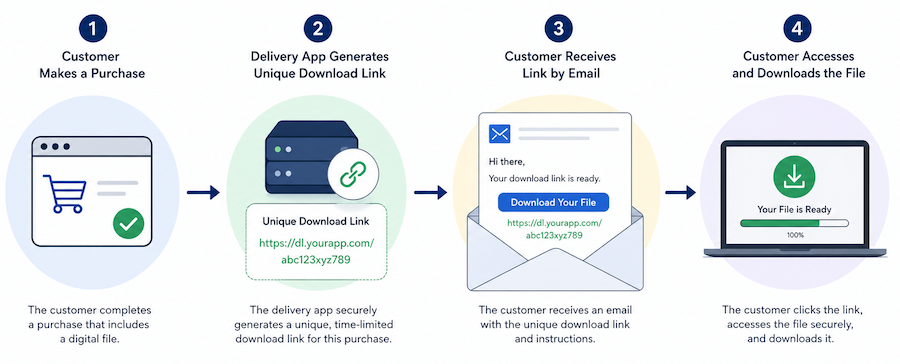
- Delivery app. A dedicated app handles secure storage, generates a unique link for each customer, and sends it automatically.
Most stores selling more than a handful of digital products land on the third option, but it is worth understanding the trade against the alternatives before committing.
Delivery Options in Detail
Each of these can deliver a file. They differ in security, automation, and how much support effort they cost you.
Manual email
Free, no setup, total control. The work scales with volume, and a missed order at 3am turns into a refund request by morning.
Cloud storage link
Slightly more automated, since the link goes in every order email. The link is the same for every customer, so once it is shared, it is shared. Acceptable for free lead magnets, risky for paid goods.
Shopify Digital Downloads (free)
Shopify's own free app handles unique download links for each customer and basic delivery. It does not have download caps, file size is limited, and analytics are minimal. Fine for low volume, occasional digital sales.
Dedicated delivery app
Apps like FileFlow, SendOwl, and Sky Pilot handle secure storage, unique links per customer, expiry, and download caps. They surface the file alongside the order so the customer can return to it. FileFlow has a free tier and works by attaching files to existing Shopify products.
Download Limits and Piracy
Public links get shared. The defences your delivery method gives you are:
- Unique links per customer. Each customer gets their own URL. If a link is shared, you can see whose account it came from and revoke it.
- Download limits. A link works for N downloads, then stops. Five is a common starting number.
- Link expiry. A link works for N days, then stops. Useful when customers want to keep their copy locally rather than redownload every time.
- Watermarking. For high value goods (music, premium templates), watermark the file with the customer's order ID so a leaked copy is traceable.
A delivery app handles the first three by default. Watermarking is usually a feature of premium plans or specialist tools. The right combination depends on what you are selling and the cost of a leaked copy.
What Most Stores Land On
For the typical store starting out:
- Use Shopify for the product, the checkout, and the customer record.
- Use a delivery app for storage, link generation, and download control.
- Set a download limit (five is a reasonable default), an expiry (30 to 90 days), and one watermarking rule if your file warrants it.
FileFlow fits this shape. You attach files to existing Shopify products, customers receive their link automatically on purchase, download caps and expiry are configurable, and there is a free tier to start. It is one of several apps that can do this; the broader point is that some app should own the delivery, before your inbox does.
What to Do This Week
If you have a digital product idea but no store yet, set up the product in Shopify first and keep delivery on manual email until you make your first sale. What matters first is whether anyone buys at all. Automation can wait until you know there is demand.
Once you have a steady trickle of orders, move to a delivery app. The transition is one afternoon: install, attach the existing files to the existing products, test with a small order. Future orders flow through the app from that point on.
Selling digital products on Shopify is one of the simplest catalogues to run, once the delivery question is solved. The setup is the same regardless of whether you sell one ebook or a hundred templates.
Frequently asked questions
- Do I need a special Shopify plan to sell digital products?
- No. Any Shopify plan supports digital products. You just need to disable shipping on the product and pick a delivery method.
- How do I handle tax on digital products?
- Digital tax rules vary by region. Many jurisdictions tax digital goods at the buyer's location rather than the seller's. Check Shopify's tax docs for your region or consult an accountant.
- What file types can I sell?
- Effectively anything: PDFs, audio, video, software installers, design files. The right delivery tool depends on file size and how often you update the file.
- How do I prevent piracy?
- Use download limits and expiring URLs at minimum. For high value goods, watermark files with the customer's order ID. A delivery app like FileFlow handles limits and expiry automatically.