RFM Analysis for Shopify: Find Your VIPs and Churn Risks
A practical introduction to RFM (Recency, Frequency, Monetary) analysis for Shopify stores: what it means, how to do it manually, and when to automate.
By Vellir Technologies · Published 2 April 2026
Bottom line
RFM scores customers on three axes (recency, frequency, and monetary value) to identify VIPs and churn risks. You can do it manually with a CSV export and a spreadsheet, but most stores benefit from an automated tool that keeps segments updated continuously.
What RFM Stands For
RFM stands for three numbers, each measured per customer:
- Recency. How many days since the customer's last order.
- Frequency. How many orders the customer has placed in your store, ever or in a defined period.
- Monetary. How much the customer has spent, total, in that period.
Score each on a 1 to 5 scale, where 5 is the top quintile of your customer base. Concatenate the three scores into a code: a customer with a 555 has bought recently, often, and spent a lot. A customer with a 111 has bought once a long time ago and not much since.
The codes look mechanical. The categories they produce, when grouped, tell you who matters and who is slipping away.
Why Three Numbers Beat One
Most stores measure customers by total revenue and stop there. That single number hides everything important.
A customer who spent $2,000 with you in 2022 and has not been back is worth less than a customer who spent $500 last month and is on track for another order. The first is a number on a leaderboard. The second is your future.
Recency on its own is also misleading. A first time buyer last week looks great by recency, but you do not yet know if they are a one off or the start of a habit. Frequency separates the two. Monetary then tells you whether the habit is worth nurturing or politely ignoring.
Three numbers together describe a customer's behaviour in a way one number cannot.
The Segments It Identifies
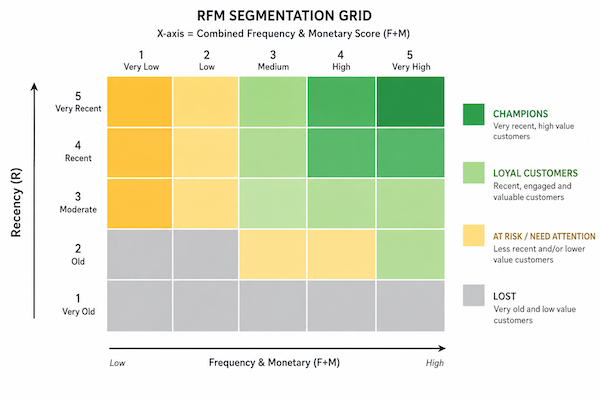
The 125 possible RFM codes (5 x 5 x 5) sound like too many. In practice they collapse to a handful of meaningful groups:
- Champions (555 and similar). Recent, frequent, high spend. The top 5 to 10 percent of customers in most stores. Your loyalty program lives here.
- Loyal customers. High frequency and monetary, recent enough. Slightly less active than champions but still good buyers. Strong candidates for early access and referral programs.
- Potential loyalists. High recency, lower frequency. Recent buyers building a habit. Nurture sequences earn the most here.
- At risk. High frequency and monetary, low recency. Customers who used to buy a lot and have gone quiet. The most urgent segment, because losing one of them is losing a champion.
- Hibernating. Low across the board. Bought once long ago, never came back. Worth one or two reactivation attempts before letting them go.
- Lost. Very low across the board. No realistic path back. Stop spending acquisition cost on them.
Two of these segments matter the most for action: champions and at risk. The first is where you concentrate retention. The second is where you concentrate intervention.
Doing RFM Manually with Shopify CSVs
You can build a usable RFM scorecard yourself with Shopify exports and a spreadsheet. The shape:
- Export orders from Shopify Admin (Orders, then Export, then CSV for selected fields). Pull a useful window: 12 to 24 months works for most stores.
- Pivot by customer email. For each customer, calculate three numbers: days since last order (R), count of orders (F), sum of order totals (M).
- Score each axis on a 1 to 5 scale. A common method: rank customers by each number, then split the rank into quintiles. The top quintile is 5; the bottom is 1.
- Concatenate the scores into the RFM code per customer.
- Group the codes into segments using a mapping you decide (champions, at risk, hibernating, etc.).
A spreadsheet handles this fine for stores with up to roughly 50,000 customers. Past that, the calculations get slow and the file size becomes a problem. A small SQL or Python script does the same job in seconds, if you have someone on the team who can write one.
Why Most Stores Only Do This Once
The RFM analysis is a snapshot. It describes customers as of the day you exported the CSV. Customer behaviour is not a snapshot. Every order shifts the picture.
Three patterns play out:
- The marketing manager runs RFM in January, builds a campaign for the at risk segment, sends it in February, and never refreshes the data.
- The data team automates the export quarterly, but campaigns lag two months behind the segments.
- The store has the analysis on file but no email channel set up to act on it. The segments collect dust.
The reason most stores stop refreshing RFM is the cost of doing it. Running the export again, scoring again, importing into the email tool again: each cycle is hours of work. Done weekly it is sustainable. Done quarterly it produces stale segments by the time they are used.
What Automated Segmentation Adds
A dedicated segmentation tool does the same calculation continuously. Every order updates the scores. Every customer's segment is current.
Beyond keeping the data fresh, automation adds:
- Triggers. When a customer crosses from champion to at risk, the system can fire an event (email, Slack notification, tag in your store) so the team can act before the customer is fully gone.
- Cohort comparison. Comparing this month's champions against last month's shows whether your retention is improving or slipping.
- Views across multiple stores. For brands running more than one Shopify store, a segmentation tool that reads across stores avoids duplicating customers.
SegmentOS is one option in this category. It automatically detects the standard RFM segments (VIPs, churn risk, revenue tiers), updates them as orders come in, and surfaces them in the Shopify admin so they are available wherever you would use a customer list.
Putting Segments to Work
A segment with no campaign behind it is decoration. A short list of campaigns that deserve their own segment:
- Champion loyalty. Early access to drops, free shipping permanently, a thank you email signed by a person at the store at least once a quarter.
- At risk win back. A targeted offer (10 to 15 percent off a category they used to buy) sent two to three weeks after they cross into the at risk segment.
- Potential loyalist nurture. A welcome series and a second order incentive, sent inside the first 30 days after first purchase.
- Hibernating reactivation. One or two attempts at a meaningful offer, then a clean removal from active marketing if they do not respond.
The campaigns matter as much as the segmentation. Each segment is a budget line. Each campaign is what spends it.
Where to Start
If you have never run RFM, do it once by hand. Export the CSV, score the customers, look at who is in each segment. The exercise teaches you more about your customer base than any dashboard, regardless of whether you stick with manual or automate later.
If the manual exercise convinces you that the segments are worth keeping current, that is the moment to look at automation. Tools like SegmentOS keep the segments live so the campaigns above can run on schedule rather than as one off projects.
The point of RFM is the conversation about which customers your marketing budget should reach first. The codes are the way to start that conversation.
Frequently asked questions
- What does RFM stand for?
- Recency (days since last order), Frequency (number of orders), Monetary (total spend). Customers are scored on each axis and the combination defines the segment.
- How often should I refresh RFM segments?
- Behaviour shifts daily. A monthly refresh is the bare minimum; weekly is better; live updates are best. Manual scoring rarely keeps up.
- Can I do RFM in Shopify natively?
- Not directly. Native segments work on filters and don't score customers across multiple axes. You need a spreadsheet or a dedicated tool.
- How does SegmentOS handle RFM?
- SegmentOS detects VIP and churn risk segments automatically using behavioural scoring and updates them as orders come in.